'Insider' update includes Linux along with new Skype, dark theme and more
Microsoft's latest "Insider" Windows 10 preview Build 14316, includes
the Windows Subsystem for Linux along with a flurry of other new
features.
The addition of a Linux command-line to Windows was
announced at Microsoft's Build conference last week. The feature is
aimed at developers, allowing them to use Linux utilities without having
to run up a virtual machine or log into a remote system.
Installing the Subsystem for Linux is a matter of
first enabling Developer Mode, par of the Update and Security settings,
and then selecting Linux from the Windows Features dialog. Once it is
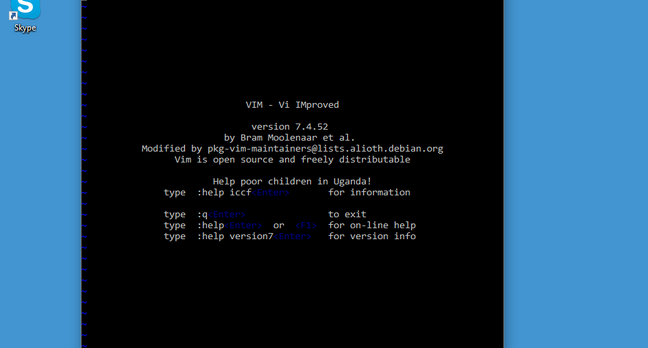
enabled, you can open a command prompt, type bash, and be prompted to
install "Ubuntu on Windows". The subsystem is then downloaded from the
Windows Store.
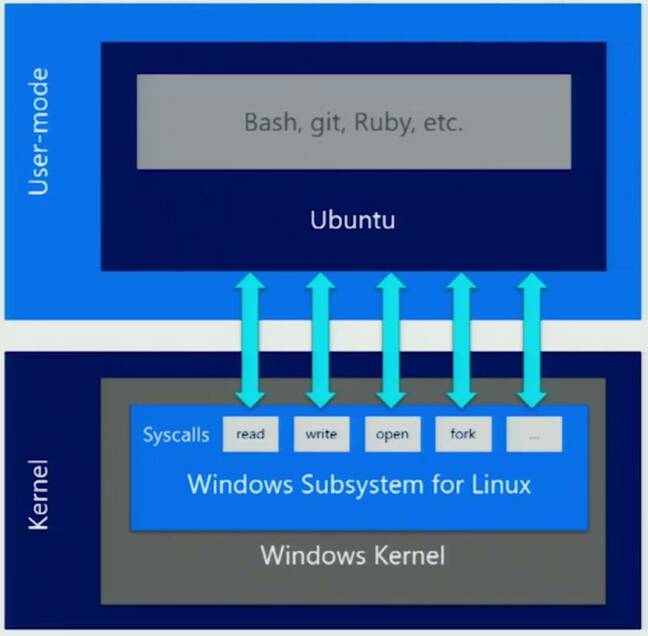
The subsystem is not an emulator, but rather
redirects Linux syscalls to Windows equivalents. When you are in bash,
you are running Ubuntu 14.04 "trusty" and can use the Apt package
manager to install the tools you need. I was able to install the
build-essential package, for example, to obtain the gcc compiler. I
could then edit, compile and run a simple C application.
The kind of scenario Microsoft envisages is when you
want to develop and test an application that will be deployed on Linux
without leaving the Windows desktop. You can also use utilities like
grep, awk and sed to manipulate files. However, you cannot run Windows
executables directly from bash. When I typed "notepad", the system
invited me to install Wine, a means of running Windows applications on
Linux.
 The preview version is by no means perfect. The "top" utility, which
should display running processes ordered by cpu usage, does not work,
for example, nor does "df" for showing free disk space. Microsoft
advises that MySQL does not work properly, and that many applications
which run as background services are problematic. This is bleeding edge
stuff, and many things have simply not been tried, so the company is
awaiting user feedback with particular interest.
The preview version is by no means perfect. The "top" utility, which
should display running processes ordered by cpu usage, does not work,
for example, nor does "df" for showing free disk space. Microsoft
advises that MySQL does not work properly, and that many applications
which run as background services are problematic. This is bleeding edge
stuff, and many things have simply not been tried, so the company is
awaiting user feedback with particular interest.Microsoft VP Gabe Aul lists numerous further features and fixes in this build, including cross-device awareness in Cortana, so your PC can inform you, for example, of low battery on your phone; new extensions for the Edge browser; the first preview of the Skype Universal Windows Platform (UWP) app, and a "dark mode" colour setting.
Another new feature is the ability to have selected windows show on all desktops, if you are using multiple desktops.
The Feedback Hub, an application for reporting bugs and other issues to Microsoft, has been updated to allow comments.
Overall this is not a build you will want to use for real work, but is nevertheless full of interest, especially for developers working on Windows but deploying applications to Linux.®
0 comments:
Post a Comment